Registering for Customer Connect is Quick and Simple
New Online Account Users
- Click on the MY ACCOUNT button at the top of this page. NOTE – you need to receive your first mailed bill before signing up.
- Click on the New user? Register link.
- Complete the form that appears. You will need to know your account number and your meter number. If you have a copy of a recent bill, it will have this information on it.
- You will receive an email confirming your registration and can now sign-in to Customer Connect.
VIEWING YOUR ACCOUNT ONLINE IS EASY
You have many opportunities to learn about your account and the electricity you use. Being an informed consumer is easy with Niagara-on-the-Lake Hydro’s Customer Connect. Through Customer Connect, you will be able to view your electric & water usage history. There are many things you can do:
MONITOR YOUR ELECTRIC USAGE HISTORY
You have several options for reviewing your usage. Normally you would see your total usage by billing period, but now you can take it another step further. You can find out your hourly usage. Everyday, the previous day’s readings are loaded into the system. You’ll be able to see how much your home costs you when you’re sleeping or even when you’re cooking dinner.
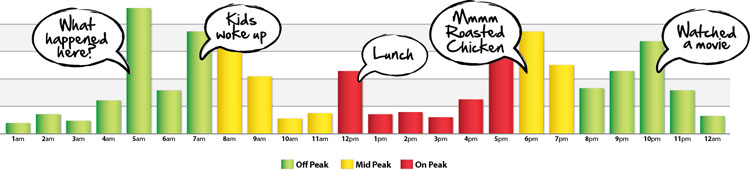
Customer Connect will start by showing your usage over the past month. You will be able to drill down to an individual day and see what you used each hour. We’ve also conveniently colour coded the Time-of-Use (TOU) time periods so you can see how your lifestyle affects your bills.
WATCH YOUR WATER
When in your online account, you’ll be able to view your usage and billing history for water. You’ll also be able to enter your current water reading to ensure that your bills are accurate. Please note that water history can only be displayed with monthly data, not by hour.
MAKE LIFE EASIER WITH eBILLING
Your online account not only gives you a chance to view your consumption, you can also make your life a little easier with its online billing options. You can sign up for eBilling and get your notices via email instead of mail.